XML, MCP, and Language Models
A Separation of Concerns
Elisa Beshero-Bondar, Molly Scott Wright, and Michael Simons
- Balisage 2026 (Thursday 6 August, 2026)
- Link to these slides:
https://newtfire.codeberg.page/slideDecks/ - DigitAI XML-MCP project on Codeberg:
https://codeberg.org/newtfire/digitxml-mcp

Penn State Erie, The Behrend College: DIGIT DH Lab

Introducing the separation of concerns
Let me try to explain to you, what to my taste is characteristic for all intelligent thinking. It is, that one is willing to study in depth an aspect of one’s subject matter in isolation for the sake of its own consistency, all the time knowing that one is occupying oneself only with one of the aspects.
On the Role of Scientific Thought(1974)
Defining the separation of concerns
We know that a program must be correct and we can study it from that viewpoint only; we also know that it should be efficient and we can study its efficiency on another day, so to speak. [. . .] But nothing is gained —on the contrary!— by tackling these various aspects simultaneously. It is what I sometimes have calledthe separation of concerns, which, even if not perfectly possible, is yet the only available technique for effective ordering of one’s thoughts, that I know of.
On the Role of Scientific Thought(1974)
Focus! Elaborating on the separation of concerns
This is what I mean byfocussing one’s attention upon some aspect: it does not mean ignoring the other aspects, it is just doing justice to the fact that from this aspect’s point of view, the other is irrelevant. It is being one- and multiple-track minded simultaneously.
On the Role of Scientific Thought(1974)
separation of concerns
today
- Familiar to web designers / developers: separate JS, CSS, content-writing
- important for XML and declarative markup community: separate the
rendering / software architecture from the meaningful content:
- separate processing from data: facilitates updating the data
- facilitates human and machine reading of that data
- future-proofs the documentary data against changes in publishing/processing technology.
Our Digital Humanities Context:
Why are we tinkering with Small Language Models?- Learning how language models work
- Learning what they can do as agents
- Researching how to downscale: sustainable economic deployment
- Crafting precision tools for research, especially to support digital scholarly editions and archives in XML.
- Following a hunch: Can we design a small-scale AI system that enters and interacts with the
world
of an XML project, deploying XML-stack tools? - If this works, it's perhaps an example of
the separation of concerns
: project XML to be addressed as XML, and not baked into the vector embedding systems of language model.
Learning the hard way last year
- We tried RAG + graph last year (shared at DH 2025 and TEI 2025 conferences)
- We built a graph in neo4j based on the p5 subset of the TEI Guidelines
- We controlled the chunking based on XML nodes so they were not cut off arbitrarily by token lengths.
- Our graph represents the XPath-able relationships across TEI XML nodes: Guidelines chapters containing paragraphs, containing code specifications.
- Then the graph had to be vectorized: converted to JSON-L embeddings to be legible to the language model.
- This was bloated: XML expresses these relationships much more efficently only its own!
- This was brittle: We'd have to convert to graph and vectorize for every update of the Guidelines, and come up with other ways for chunking for different projects.
- We therefore opted not to continue with this method.
We turned instead to MCP: Model Context Protocol
Definition: A standard used to connect models to external services, including:

- Local file systems
- Datasets
- Script tools (that we can write)
MCP = a protocol to turn a language model into an agent that applies, executes, and adapts scripts.
- Common language for all language models
Caution: Agents are demonstrably unsafe!
- Agentic models at the big labs (OpenAI and Anthropic) have been in the news a lot lately,
due to- escaping their sandbox deployments to access the internet and
hack
access to external company software, - due (says OpenAI and Anthropic) to misconfigured security protocols with third-party software
- Perhaps(?) Inefficient
separation of concerns
: Big agents are too broadly configured, needy because the tools in their containers are insufficient, therefore solve problems by escaping.
- escaping their sandbox deployments to access the internet and
- Are we going to be okay? We hope so. . .
- We're purposefully working with Small Language Models (not the large ones).
- We've learned to define clear system roles and tools for the models: limit roles to XML processing needs on specific filepaths.
- Containerizing: We mount only the filepaths needed in a Docker container, and work only there.
- Keeping things as small as possible should simplify our maintenance and limit security risks.
Why do we want MCP to work with XML?
- MCP achieves a desirable separation of concerns to prevent harm to our XML projects.
- MCP gives the model agency to execute and adapt code scripts (something language models are particularly good at).
- MCP lets us speak to XML as XML:
- When we give a language model agency to run saxon parsers for XPath, it retrieves XML nodes to read, not vector embeddings.
- The model can be optimized to look for patterns in the structure of the markup, and apply patterns in XSLT templates.
- Keep the XML encoding itself separate from the potential for language model hallucinations.
- Failures and hallucinations are confined to processing code scripts, and when these don't work, the model agent system starts again and revises its approach.
- Language models should not need comprehensive RAG embeddings of XML data, if they can directly access schema validation reports and access XPath to review a document's own data modeling.

Docker containers for AI Projects
- Safety first!
- Creates a secure working environment within your computer
- You control which files and resources from outside the container are available inside
- You control how the models in the container interact with your ports / browsers / software on the outside.
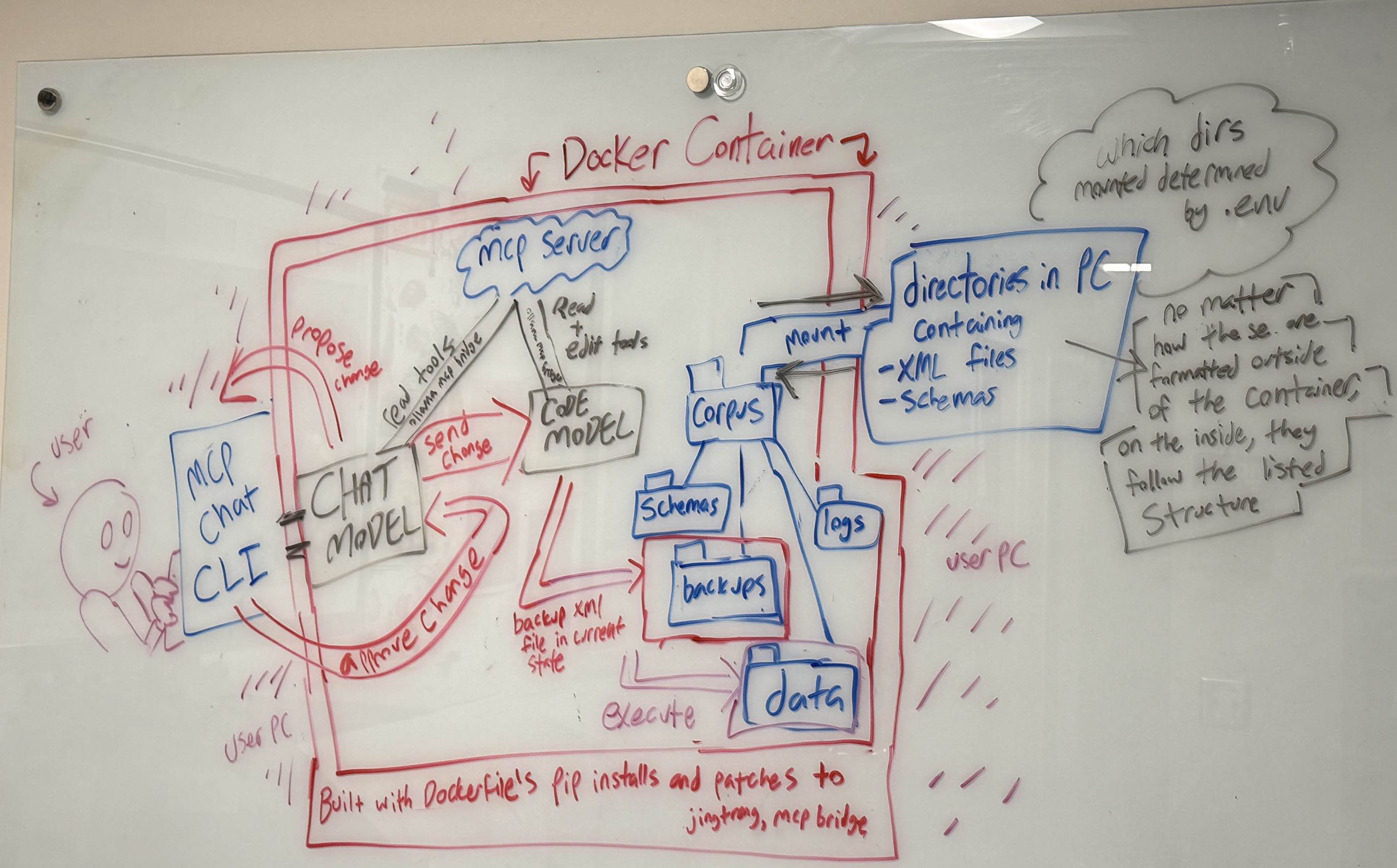
Chat and Code Models: Another separation of concerns
- When working with SLMs of ~2B parameters, it is best to:
- Pair them;
- Provide each specific roles / system prompts,
- User interacts with the Chat model
- Chat model interacts with the Code model
- Chat model reviews / recommends / requests feedback from the User
- Code model takes action as requested by the Chat model.
The scholar's file directories mounted in Docker container
- Scholarly project files:
- XML files in project corpus, standoff files, etc.
- ODD customization of TEI + output Relax NG schemas (MCP executes jing to validate with Relax NG)
- MCP process stores output files:
- MCP process generates transformed files (but does not overwrite original data without user permission)
- MCP process stores logs of all transformation files it generates.
- We can use the log files to fine-tune the Code and Chat models.
Seeing if and how our system works
Trying out MCP on our own tricky XML!
- Relax NG validation
- XPath / XQuery for queries
- XSLT for transformation
- (all dependent on finding the files in the first place!)
Our test file
- "Weird" encoding of a recipe
- Purposefully not valid to the schema
- Unevenly encoded, even when valid
                      <?xml version="1.0" encoding="UTF-8"?>
<?xml-model href="../schemas/recipe.rnc" type="application/relax-ng-compact-syntax"?>
<recipe><healthData>About this recipe Healthiness : (71 votes)</healthData>
    <!--ebb: Hi This is a comment -->
    <!--ebb 2020-08-27: I like putting initials on my comments, and sometimes the date,
             especially if multiple people are writing comments on a code file. -->
    <para>The <culture ref="England" monarch="George_III">Georgians</culture> loved rich, sweet food. Sugar had become much
        more easily available (mostly because of the Transatlantic Slave Trade) and was fast
        replacing honey as the main food sweetener.</para>
    <para>This version of the syllabub recipe was by <name type="person">Eliza Acton</name>, who
        lived in <timePeriod>18th century</timePeriod>. There are <altRecipe>plenty of earlier
            versions but they are more likely to curdle as they contain cider</altRecipe>. This
        version was very modern and fashionable in its day and is easy to manage: <blockQuote>Take a
            quart of cream, a pint of sack, juice of a lemon, whip it, as the froth flies take it
            off with a spoon and lay it in glasses: but first you must sweeten and stir some white
            wine into your glasses, and gently lay on your froth. Set them by and do not make them
            long before you use them.</blockQuote>
    </para>
    <para>Sugar and sherry (known as sack) were still expensive ingredients and dishes like this
        would have been eaten in the houses of the richer merchants who would be able to afford
        sugar, lemons, new salad vegetables and sack.</para>
    <para>We have added a non-alcoholic lemon syllabub for you to try too.</para>
    <para>For images of the cooking process see our Syllabub Pictures.</para>
    <para type="credits">With thanks to <name type="person">Ian Pycroft</name> of <name
            type="organization">Black Knight Historical</name> and to <name type="organization">The
            Georgian House, <name type="place">Bristol</name></name>.</para>
    <section kind="ingred">
        <heading>Ingredients</heading>
        <list><it quant="1" unit="fruit">1 <ingred>lemon</ingred></it>
            <item quant=".25" unit="pint">1/4 pint <ingred>sack</ingred> (pale or dark)</item>
            <item qant="2 3" unit="ounce">2-3 oz <ingred>caster
                sugar</ingred></item><!-- This is one way to handle multiple good values in an attribugte,
                with quant="2 3": It means quant can be 2 or 3.-->
            <item quant=".5" unit="pint">1/2 pint <ingred>double cream</ingred></item>
            <item quantLow="4" quantHigh="6" unit="Tb">4-6 tablespoons <ingred>sweet/dessert white
                    wine</ingred>
            </item>
        </list>
    </section>
    <section kind="equip">
        <heading>Equipment</heading>
        <list>
            <item>Knife</item>
            <item>Grater</item>
            <item>Chopping board</item>
            <item>Mixing bowl</item>
            <item>Jug</item>
            <item>Tablespoon</item>
        </list>
    </section>
    <section kind="process">
        <heading>Making and cooking it</heading>
        <listStep>
            <step num="1">Always <action>wash</action> your hands before preparing food</step>
            <step num="2"><action>Grate</action> half the peel, <action>pare off</action> the rest
                in fine strips</step>
            <step num="3">Place sherry, grated peel, lemon juice and sugar in bowl and
                    <action>soak</action> for 2 hours</step>
            <step num="4"><action>Whip</action> the cream until semi-stiff</step>
            <step num="5"><action>Add</action> sherry gradually</step>
            <step num="6"><action>Spoon</action> a little wine into glass and spoon on whipped
                cream</step>
            <step><action>Decorate</action> the top with lemon peel sticks</step>
            <step num="8"><action>Serve</action> with Shrewsberry cakes</step>
        </listStep>
    </section>
</recipe>
Relax NG Schema for Recipe XML
This is purposefully uneven, rookie
student code for testing purposes.
start = recipe
recipe = element recipe {healthData, para+, section+}
healthData = element healthData {text}
para = element para {type?, mixed{ (culture | name | timePeriod
| altRecipe | blockQuote )*}}
culture = element culture {ref?, monarch?, text }
ref = attribute ref {text}
monarch = attribute monarch {text}
name = element name {type, mixed{name*}}
type= attribute type {"person" | "place" | "organization"
| "credits"}
timePeriod = element timePeriod {text}
altRecipe = element altRecipe {text}
blockQuote = element blockQuote {text}
section = element section {kind, heading, (\list | listStep) }
kind = attribute kind { "ingred" | "equip" | "process"}
heading = element heading {text}
\list = element list {item+}
listStep = element listStep {step+}
item = element item {quant?, quantLow?, quantHigh?, unit?,
mixed{(ingred)*}}
ingred = element ingred {text}
quant = attribute quant {list{xsd:float+}}
quantLow = attribute quantLow {xsd:float}
quantHigh = attribute quantHigh {xsd:float}
unit = attribute unit {"fruit" | "pint" | "ounce"
| "Tb" | "t" | text}
step = element step {num, mixed{(action | ingred)*}}
num = attribute num {xsd:int}
action = element action { text}XPath, XQuery, XSLT
MCP Tool Calls
              try:
  if name == "xpath_query":
      result = self.saxon_server.xpath_query(
          xpath=arguments["xpath"],
          version=arguments.get("version", "3.1"),
          return_count=arguments.get("return_count", False)
      )

  elif name == "xquery_query":
      result = self.saxon_server.xquery_query(
          xquery=arguments["xquery"],
          external_vars=arguments.get("external_vars")
      )

  elif name == "xslt_transform":
      result = self.saxon_server.xslt_transform(
          xslt=arguments["xslt"],
          params=arguments.get("params"),
          save_output=arguments.get("save_output")
      )

  elif name == "get_structure_summary":
      result = self.saxon_server.get_structure_summary(
          max_depth=arguments.get("max_depth", 3)
      )

  elif name == "find_irregularities":
      result = self.saxon_server.find_irregularities(
          checks=arguments["checks"]
      )

  elif name == "apply_transformation":
      result = self.saxon_server.apply_transformation(
          xslt=arguments["xslt"],
          validate=arguments.get("validate", True),
          description=arguments.get("description", "")
      )

  elif name == "batch_corrections":
      result = self.saxon_server.batch_corrections(
          corrections=arguments["corrections"],
          validate=arguments.get("validate", True)
      )

  elif name == "create_backup":
      backup_path = self.saxon_server.create_backup()
      result = {
          "success": True,
          "backup_path": backup_path
      }

  elif name == "reload_document":
      self.saxon_server.reload_document()
      result = {
          "success": True,
          "message": "Document reloaded"
      }

  elif name == "list_available_documents":
      result = self.saxon_server.list_available_documents()

  elif name == "load_document":
      result = self.saxon_server.load_document(
          filename=arguments["filename"]
      )
  elif name == "list_available_schemas":
      result = self.saxon_server.list_available_schemas()


  else:
      result = {
          "success": False,
          "error": f"Unknown tool: {name}"
                    }
MCP Tool Scripts: XSLT model for generating corrections
We provide a basic "stub" of code for an XSLT 3.0 identity transformation. Review the Jing + Saxon tool scripts on our Codeberg repo at saxon_mcp_server.py
 def _generate_correction_xslt(self, corrections: list[dict]) -> str:
        """Generate XSLT 3.0 stylesheet from correction operations"""
        templates = []

        for i, correction in enumerate(corrections):
            op = correction.get("operation")

            if op == "update":
                xpath = correction["xpath"]
                updates = correction["updates"]

                # Generate template for update
                template = f"""
    <xsl:template match="{xpath}" priority="{i + 10}">
        <xsl:copy>
            <xsl:copy-of select="@*"/>
"""
        if "attributes" in updates:
          for attr, value in updates["attributes"].items():
            template += f'<xsl:attribute name="{attr}">{value}</xsl:attribute>\n'

        if "text" in updates:
          template += f'<xsl:text>{updates["text"]}</xsl:text>\n'
        else:
          template += f'<xsl:apply-templates select="node()"/>\n'

        template += """</xsl:copy>
    </xsl:template>
"""
        templates.append(template)

    elif op == "delete":
          xpath = correction["xpath"]
          templates.append(f'<xsl:template match="{xpath}"/>\n')

  # Build complete stylesheet
  xslt = f"""<?xml version="1.0" encoding="UTF-8"?>
<xsl:stylesheet version="3.0"
xmlns:xsl="http://www.w3.org/1999/XSL/Transform">
     <xsl:mode on-no-match="shallow copy"/>
    <xsl:template match="/">
       <xsl:apply-templates/>
    </xsl:template>

    <!-- Correction templates -->
{''.join(templates)}
</xsl:stylesheet>
"""
        return xslt

Claude and MCP
- Anthropic, the developers of Claude, are the ones who introduced MCP
- The process of connecting an MCP Server to Claude Desktop is well-documented and straightforward
- Became our on-ramp
Why we moved out
- Claude wasn't small!
- Claude wasn't necessarily safe!

Our SLM Stack: Providing users options
      MODELS = [
    {
        "label": "Qwen 3.6 (27B)",
        "id": "qwen3.6:27b"
    },
    {
        "label": "Qwen 3 Coder",
        "id":    "qwen3-coder:latest",
    }
    ,
    {
        "label": "Qwen 2.5 (1.5B)",
        "id": "qwen2.5:1.5b",
    },
    {
        "label": "Qwen 3.5 (9B)",
        "id": "qwen3.5:9b",
    },
    {
        "label": "SmolLM3",
        "id": "smollm3-tools:latest",
    }
]
def select_model(default_id: str) -> dict:
"""Prompt the user to choose a model. `default_id` is used when the
user just presses Enter. Returns the selected model dict."""
  default_index = next(
     (i for i, m in enumerate(MODELS) if m["id"] == default_id),
        None
    )
    if default_index is None:
        print(f"{COLOR_ERROR}Warning:
          default model '{default_id}' not in MODELS list
          — falling back to first entry.{RESET}")
        default_index = 0

    print(f"\n{BOLD}{COLOR_HEADER}Available models:{RESET}\n")
    for i, m in enumerate(MODELS):
        print(f"  {COLOR_LABEL}{i + 1}.{RESET} {m['label']}")
        print(f"     {DIM}{m['id']}{RESET}")
    print()

    while True:
        raw = input(
            f"{COLOR_LABEL}Choose a model [1–{len(MODELS)}, "
            f"or Enter for default ({DEFAULT_MODEL_INDEX + 1})]: {RESET}"
        ).strip()

        if not raw:
            chosen = MODELS[DEFAULT_MODEL_INDEX]
            if ensure_model_available(chosen["id"]):
                print(f"{DIM}Using default: {chosen['label']}{RESET}")
                return chosen
            else:
                print(f"{COLOR_ERROR}Default model unavailable.
                Please select another.{RESET}")
                continue
        if raw.isdigit() and 1 <= int(raw) <= len(MODELS):
            chosen = MODELS[int(raw) - 1]
            if ensure_model_available(chosen["id"]):
                return chosen
            else:
                print(f"{COLOR_ERROR}Skipping —
                please choose another model.{RESET}")
                continue  # loop back to prompt again
        print(f"{COLOR_ERROR}Please enter a number
        between 1 and {len(MODELS)}.{RESET}")
MCP-Bridge with Docker
Differences from working with Claude
- Claude Desktop had functioned as its own container, into which we mounted file directories.
- Shifting to Docker posed the question of finding the right model(s), rather than using what's immediately available
- Ollama-MCP Bridge = convenient integration tool with Docker for exploring SLMs.
- Docker: good for pairing models: Small models separated for chatting/coding work better than making one do everything.
- Docker: good for setting up logs!
Why Logs Matter
- Logs = valuable resource in fine-tuning existing models
- Logs can tell us when the model is taking
the long road around
, and inefficiently solving a problem. - Logs show when users have to repeat themselves and refine their questions.
Next steps: What we intend for our logs
- Create a directory for each interaction, named with date and SLM model identification.
- Generate an XML file that stores:
- user interactions with the chat model
- XPath and XQuery expressions that were part of the model’s
thinking
process.
- Store complete generated XSLT files associated with this interaction.
What we're still developing!
- We're not ready to quantify how well these are doing.
- Some ethically-sourced models that are not readily available via Ollama require extra careful scripting to be sure they are working as agents and not just interacting in chat windows (e.g. SMOL and PLEIAS models).
- We are currently still working with our bad recipe XML for calibration to be sure that our system is operational.
- Next steps: Need to start applying to larger XML projects and scale up!
Is there real value here for supporting XML projects?
- Yes...we think so, but we have only just begun...
- We have spent a lot of time refining access to file paths, and ensuring that the code models can execute schema validation!
- Schema validation and XPath tools definitely help the models to review the code precisely and provide helpful reviews!
SLMs for XML: The picture from our lab so far...
- Small models can be very slow with MCP tools,
- But two models are better than one!
- Speed improves significantly when two models are given precise system prompts.
- SLM MCP system produces delightful XSLT transformations for code improvement!
- Because we don't let the models change the XML directly, they are only writing and executing XSLT after identifying nodes to transform!
- We expect our MCP system to improve in ability to respond to our requests with
experience
:- from reviewing the logs we save,
- and the code generated with each user interaction.